Tutorial - Compile Smart Contracts using the Ultra Smart Contract VS Code Extension
Compiling smart contracts is very simple with the Ultra Smart Contract VS Code Extension.
Prerequisites
- Have installed the Ultra Smart Contract VS Code Extension. Refer to Install and Setup the Ultra Smart Contract VS Code Extension Tutorial for more information.
INFO
The tutorial is up-to-date with version 1.4.2 of the VS Code extension
Goal
The goal of this tutorial is to compile smart contracts using the Ultra Smart Contract VS Code Extension.
How to Compile
There are two ways to compile your smart contract.
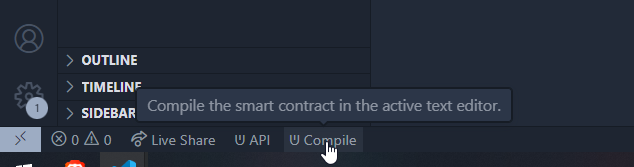
First way is to compile using the VS Code Status Bar. Make sure you have the .cpp file open and selected and click Compile at the bottom of VS Code.
Second way to compile is to use the Command Palette (F1) and search for Ultra: Build Contract.

Successful Compilation
If the compilation is successful, you won't see any errors in the output window for ultra-cpp.

Bad Compilation
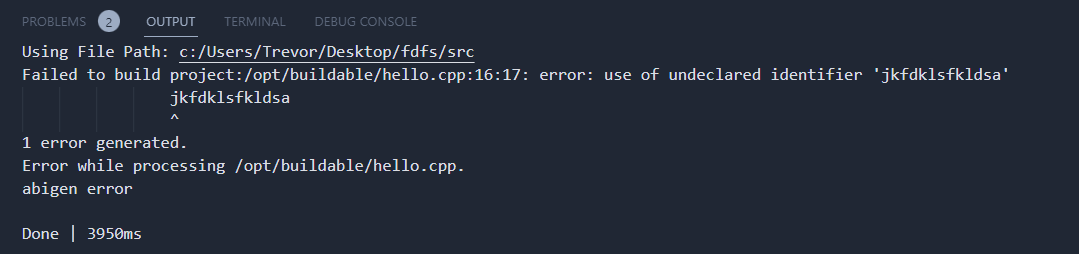
If the compilation is successful unsuccessful, you will see various errors such as the ones below.
Compiled Files
Once the files are compiled you should see an abi and a wasm file next to your compiled smart contract.

For more information about .abi and .wasm files see the official EOS Network Foundation page
What's next?
The next tutorial will cover deploying smart contracts using the VS Code extension. See Tutorial - Deploy Smart Contracts using the Ultra Smart Contract VS Code Extension for more information.